A customer phoned one of our clients to ask why nobody had answered the quote request they sent through the website. A few days later, another customer called with the same question. The form looked fine. It even said “Thank you.” But the address it sent to had been damaged in the website’s database, so every request was going nowhere.
We fixed the address, then pulled every inquiry from that year out of the website and sent the full list to the owner, so they could call people back. Most businesses are not that lucky: nobody calls to say the form is broken. They simply hire someone else. Here is why form emails go missing, how to test yours in two minutes, and how to fix each cause.
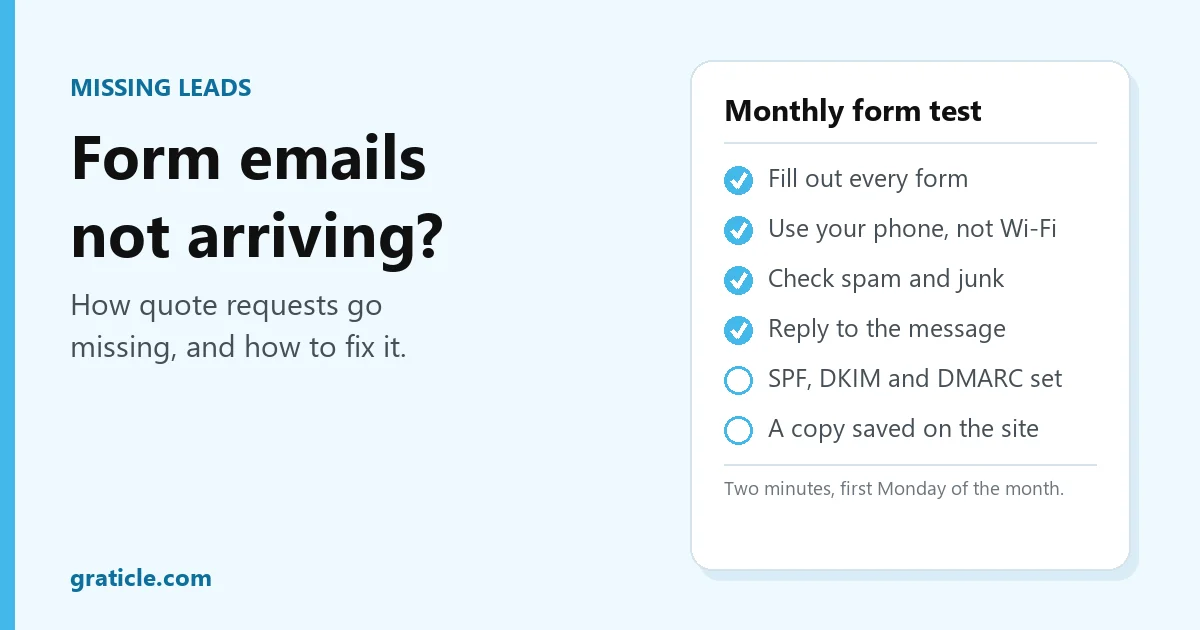
The Two-Minute Monthly Test
- On your phone, open your website the way a customer would. Use cellular data, not your office Wi-Fi.
- Fill out every form: contact, quote, booking. Use a personal email address that is different from your business one.
- Check that each one arrives at the right inbox within a few minutes, and check the spam or junk folder too.
- Reply to it. Make sure the reply goes to the email address you typed in, not back to your own website.
Put it on your calendar for the first Monday of every month. It is the cheapest insurance a local business can buy.
Why Form Emails Go Missing
The form sends to the wrong address
An employee left and the form still sends to them. Someone mistyped the address. Or, like our client, the setting was damaged and nobody noticed. The form still says “Thank you” either way.
Your email provider does not trust the message
Your website sends email that says it is from your domain. Gmail and Microsoft check whether your domain has approved that sender, using three short settings called SPF, DKIM and DMARC. If they are missing or wrong, the message lands in spam or is rejected without a trace. We have seen a single mistyped character in one of these settings cause the signing to be switched off.
The server has a bad reputation
Many websites send email from the same server as hundreds of other sites. If one of those sites sends spam, the whole server can be flagged. One online store’s order emails stopped reaching customers this way. The fix was to send the website’s email through a dedicated email delivery service, with the right settings added to the domain. Mail was flowing normally again within about five days.
Your own inbox filters it
A rule someone set up years ago, a full mailbox, a forwarding address that stopped working, or a spam filter that learned the wrong lesson.
The form itself broke
A plugin update, a change to the page, or spam protection that blocks real people along with the bots.
How to Fix Each One
- Check where the form sends. Ask your web person to confirm the address on every form, and to send a copy to a second address as a backup.
- Check your domain’s email settings. Our free email security check shows whether SPF, DKIM and DMARC are set up for your domain. If your domain is on a spam list, our guide to checking an email blacklist walks through the fix.
- Send website email through a delivery service. Instead of the web server, use a service built to deliver email, connected to your domain. This is the single biggest improvement for most small business sites.
- Look in your spam folder and rules. Mark form messages as “not spam” and add the sending address to your contacts.
- Keep a copy on the website. Most form tools can save every submission. If an email is ever lost, the request is still there.
How to Make Sure It Never Happens Quietly
On the websites we manage, every form sends through a dedicated email delivery service with the domain’s signing settings in place, a copy of each request is kept, and forms are tested at launch and after changes. Spam protection runs quietly in the background, so customers never have to solve a puzzle. We are honest about one thing: no filter stops every spam message a person types by hand. It does stop the bots.
If you get very few form messages, also read tips to get more people to fill out your contact form. Sometimes the problem is the form, and sometimes it is the page around it.
Questions People Ask
Why does my contact form say thank you but I never get the email?
The thank-you message only means the website accepted the form. The email can still be sent to the wrong address, filtered as spam, or rejected because your domain’s email settings are missing.
How often should I test my website forms?
Once a month, and after any change to your website or email. Fill out each form on your phone and check that it arrives at the right inbox.
What are SPF, DKIM and DMARC?
Three short settings on your domain that tell email providers which senders are allowed to send mail for you. Without them, mail from your website is more likely to land in spam.
Can I get back requests that never arrived?
Often, yes. Many form tools save every submission on the website even when the email fails. Ask your web person to check before assuming they are lost.