
Brand · Business name change
Changing your business name without losing customers or rankings
A new name touches more than a sign. Your logo, website, domain, email, Google Business Profile and every directory listing have to change together, in the right order, so customers can still find you and Google keeps trusting you. We handle the online side in one go.
Your Google reviews stay with you · Old links keep working · A price in writing first
What a new name touches
- Logo, signs and trucks
- Website and domain
- Email addresses
- Google Business Profile
- Directories and social pages
- Cards, invoices and forms
Change them together so customers see one name everywhere.
Everything a New Name Touches
Most of the trouble after a name change comes from one place that was missed: an old email address, a directory listing or a Google profile that still shows the old name.
Logo and brand
A new logo, or your current style with the new name, in versions for the website, trucks, shirts, signs and social pages. See logo design.
Website and domain
The new name on every page, a new domain if you want one, and every old page address sent to its new match so links and bookmarks still work.
New addresses on the new domain, with the old ones forwarding, so nothing a customer or supplier sends gets lost.
Google Business Profile
The name, logo, cover photo and website link updated the right way, so your reviews and map ranking carry over. See Google Business Profile help.
Directories and social pages
Bing, Apple Maps, Yelp, Facebook, Nextdoor, the Better Business Bureau, your chamber and your trade directories, all showing the same name, phone and address.
Print and paperwork
Business cards, estimate and invoice forms, yard signs and vehicle lettering in the new look. See print design.
Do It in This Order
The order matters. Google checks that the name on your profile matches the name on your website and your sign, so those come first.
Settle the name
Check that the domain is free, that no nearby business already uses the name, and that the social page names you want are open.
Make it official
Register the new trade name with the Washington Business Licensing Service. Contractors also update their registration with Labor and Industries. Your accountant or attorney can help with this part.
Logo and brand
Settle the logo and colors before anything is printed or published, so every place gets the same version.
Website, domain and email
Launch the website under the new name, redirect the old domain page by page and set up email forwarding.
Google Business Profile
Once the website and sign match, update the name on your profile, then the logo, photos and website link.
Everything else, then tell people
Directories, social pages and print. Then an announcement to customers, on your profile and on social media.
Keep Your Google Rankings and Reviews
Your website rankings
Keep the old domain renewed for years, not months. Send each old page to its matching new page rather than everything to the homepage, and tell Google about the move in Search Console. Mention the old name on your About page for a while (“formerly…”), so people who search the old name still find you. Expect a few weeks of movement while Google catches up.
Your Google reviews
Change the name on your existing profile. Do not create a new one, or the reviews stay behind. Google may review the change, and sometimes asks you to verify the business again, which is why the website and sign should already match. Use the real name only, with no added town or service words.
If you are a contractor, Washington requires your registration number in your advertising, including your website, and the name on that registration should match the new one. Our guide to closing or selling a business website covers the domain and account questions when ownership changes too.
An Example: TK Construction & Roofing
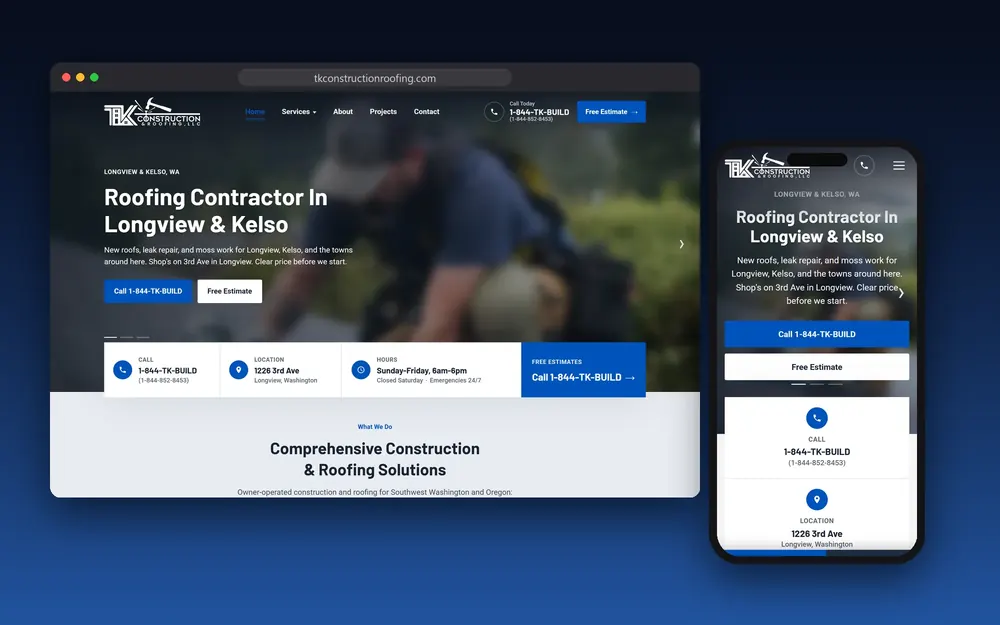
TK Construction & Roofing grew from a handyman business into a roofing and remodeling contractor in Longview and Kelso, and its old website still carried the old name.
We built a custom-coded website for the new name, with a page for every kind of work, the state registration details the law requires and a free estimate on every page.
Questions People Ask
Will I lose my Google reviews if I change my business name?
No, as long as you change the name on your existing Google Business Profile instead of creating a new one. The reviews stay with the profile. Google may review the change or ask you to verify the business again, so have the new name on your website and sign first.
Will my website lose its rankings?
Not if the move is done carefully. Keep the old domain, redirect every old page to its matching new page and tell Google about the change in Search Console. Rankings can move for a few weeks while Google catches up.
Should I keep my old domain name?
Yes. Keep it renewed for years. Old links, printed cards, truck lettering and saved bookmarks all point to it, and it sends visitors to the new site.
Can I keep my email address?
You can keep the old addresses forwarding to the new ones, so nothing gets lost while customers and suppliers update their contacts.
Do I need a new logo?
Not always. Sometimes your current colors and style can carry the new name. We will tell you which makes sense for your business.
How long does a name change take?
It depends on how many places your name appears. We list everything that needs to change, then give you a timeline and a price in writing before we start.
What about the legal side?
In Washington, a new trade name is registered with the Business Licensing Service, and contractors update their Labor and Industries registration. Your accountant or attorney can advise on the rest. We handle the online side: logo, website, domain, email, Google and directories.
Changing Your Name Soon?
Tell us the old name, the new one and when you want to switch. We will list everything that needs to change and give you a price in writing.
